PDF Accessibility Remediation Workflow
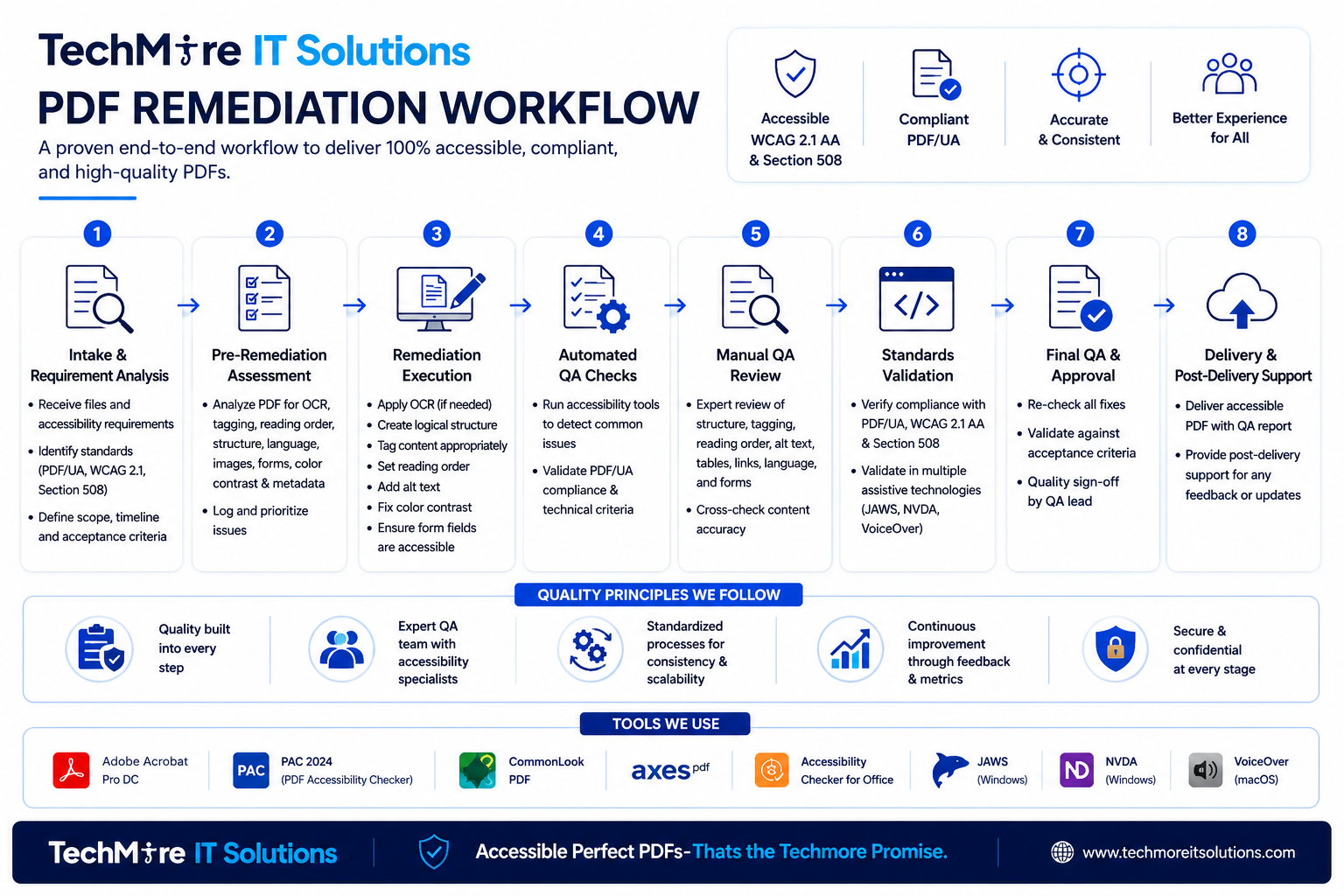
Explore our proven end-to-end 8-step workflow to deliver 100% accessible, compliant, and high-quality PDFs.
Deep Dive into the 8 Steps
Every document we touch passes through this rigorous checklist to ensure pixel-perfect accessibility structures and compliance.
Intake & Requirement Analysis
Receive source files and establish the foundational digital accessibility requirements.
- ✓Receive source files & define project scope
- ✓Identify target standards (PDF/UA, WCAG 2.1, Section 508)
- ✓Establish timeline, deliverables & acceptance criteria
Pre-Remediation Assessment
Comprehensive automated and manual scanning of document architecture to detect obstacles.
- ✓Check OCR quality & image layer integrity
- ✓Analyze tags, reading order, headings & metadata
- ✓Identify form fields, tables, lists & color contrast errors
Remediation Execution
Hands-on correction of structural elements, reading paths, and compliance properties.
- ✓Build proper logical tag tree structure
- ✓Apply reading order, H1-H6 headers & list tags
- ✓Add descriptive alt text & fix color contrast issues
Automated QA Checks
Systematic automated scanning to rule out programmatic errors and validation glitches.
- ✓Run PAC 2024 compliance validator
- ✓Analyze Adobe Acrobat Accessibility check reports
- ✓Confirm metadata, tab order & language settings
Manual QA Review
Meticulous human verification of structures, reading flows, and content integrity.
- ✓Expert row-by-row review of complex data tables
- ✓Verify nested lists & hyperlink descriptions
- ✓Cross-check visual elements against structure tags
Standards Validation
Validating the user experience with leading assistive technologies and standards.
- ✓Verify PDF/UA-1 & WCAG 2.1 Level AA conformance
- ✓Perform live screen reader testing (NVDA & JAWS)
- ✓Execute VoiceOver testing on Apple macOS/iOS
Final QA & Approval
Strict final validation check to guarantee that all deliverable requirements are met.
- ✓Re-verify fixes against baseline feedback logs
- ✓Confirm file size, load speeds & optimization specs
- ✓Official compliance sign-off by our QA team lead
Delivery & Support
Secure dispatch of compliant files along with comprehensive validation reporting.
- ✓Dispatch 100% compliant PDF documents securely
- ✓Provide automated & manual compliance validation reports
- ✓Offer post-delivery revisions & continuous consultation
Quality Principles We Follow
Quality Built-In
Accessibility checks are integrated directly at every phase of the process, rather than treated as a final polish.
Expert QA Team
Remediated by certified accessibility specialists who manually verify reading orders, tag trees, and assistive tech flows.
Standardized Process
Standardized templates and rigorous checklist systems ensure consistent results even for bulk-volume projects.
Continuous Feedback
Internal audit procedures and customer review loops drive continuous tuning of our tools and automated engines.
Secure & Confidential
Strict adherence to NDA protocols, data classification guidelines, and secure document handling pipelines.
Industry Standard Tools We Use
PDF/UA · WCAG 2.1 · Section 508 — Premium quality, absolute compliance, 100% verified.